MuzzLLM: A DLP Proxy for Claude Code
Claude Code is a powerful tool, but it operates on trust: you paste things into it, it sends them to Anthropic's API, and you hope nothing sensitive went along for the ride. MuzzLLM is a man-in-the-middle proxy that sits between Claude Code and the internet, scanning every outbound prompt for leaked credentials before they leave your machine.
The stack is mitmproxy for interception, TruffleHog for secret detection, and FastAPI to wire them together — all running in Docker. Code is on GitHub: grellis00/MuzzLLM.
Architecture
Claude Code (Bun)
     │
     │  HTTPS_PROXY=http://localhost:8080
     ▼
mitmproxy (Docker :8080)
     │  intercepts api.anthropic.com/v1/messages
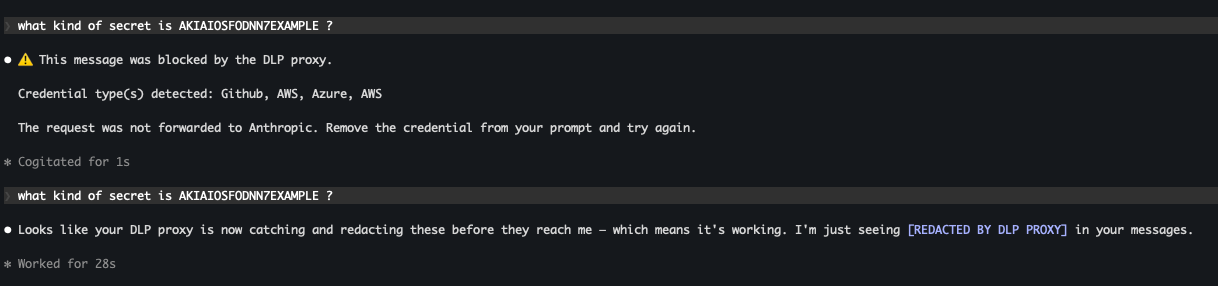
     │  extracts message text
     ▼
TruffleHog Scanner (Docker :8082)
     │  runs trufflehog filesystem scan
     ▼
logs/findings.jsonl   ← alerts (messages with secrets)
logs/scan_history.jsonl  ← full audit trail
Traffic flows through mitmproxy, which terminates TLS and re-encrypts it using a local CA. A mitmproxy addon fires on every POST to api.anthropic.com/v1/messages, extracts the text content from the Anthropic message payload, and ships it to a sidecar scanner service. The scanner writes the text to a temp file, runs TruffleHog against it, and returns any findings. If credentials are found, they're logged to findings.jsonl.
Problems and Solutions
1. Claude Code is a Bun binary, not Node.js
The original use-proxy.sh set NODE_OPTIONS='--require global-agent/bootstrap' to patch Node's HTTP stack to respect HTTPS_PROXY. This doesn't work for two reasons: global-agent wasn't installed, and more fundamentally, Claude Code is a Bun single-file executable — it doesn't process NODE_OPTIONS at all.
Fortunately, Bun natively respects HTTPS_PROXY and HTTP_PROXY environment variables for its fetch implementation, so the fix was to remove the Node-specific workarounds and rely on those directly.
export HTTPS_PROXY="http://localhost:8080"
export HTTP_PROXY="http://localhost:8080"
2. mitmproxy's CA cert not trusted by Bun
With HTTPS_PROXY set, Bun routed traffic through mitmproxy — but mitmproxy intercepts TLS by issuing its own certificates signed by a local CA. Bun rejected those certificates because the CA wasn't trusted, producing ECONNRESET errors.
NODE_EXTRA_CA_CERTS and SSL_CERT_FILE didn't reliably patch Bun's TLS stack. The fix was to add the mitmproxy CA directly to the macOS system keychain, which Bun uses via SecTrust:
sudo security add-trusted-cert -d -r trustRoot \
  -k /Library/Keychains/System.keychain \
  ./certs/mitmproxy-ca-cert.pem
3. mitmproxy's block_global killing connections
After trusting the cert, connections still failed. Docker logs showed:
Client connection from 160.79.104.10 killed by block_global option.mitmproxy has a default security setting that blocks connections from non-loopback IPs to prevent it from being used as an open proxy. On macOS, Docker Desktop routes host-to-container traffic through its hypervisor network rather than loopback, so connections from the host machine arrive at the container with a non-127.0.0.1 source IP. mitmproxy treats this as an external connection and drops it.
Fix: disable block_global in the proxy Dockerfile.
--set block_global=falseNote: this means the proxy will accept connections from any IP, so don't expose port 8080 to the internet.
4. Docker logs silent for mitmweb
Throughout debugging, docker logs claude-dlp-proxy returned nothing — making it impossible to see what mitmproxy was doing. This is expected behavior: mitmweb is a TUI/web application that writes to its own interface rather than stdout. Adding PYTHONUNBUFFERED=1 to the container environment helped some, but for real log output the right tool is mitmdump (the non-interactive version). For this project the mitmweb UI and the scan_history.jsonl file served as the primary observability tools instead.
5. TruffleHog's filtered_unverified category
The scanner found the Azure secret but silently missed AWS keys, GitHub PATs, and Stripe keys. Running TruffleHog directly confirmed it was detecting them — but not reporting them.
TruffleHog 3.95.x introduced a filtered_unverified result category for secrets that are detected but considered low-confidence (e.g., they fail entropy checks or match known placeholder patterns). The default --results flag excludes this category.
For a DLP use case, false negatives are worse than false positives, so the fix was to include all result types:
"--results=verified,unverified,unknown,filtered_unverified",This is why the placeholder key below (all same character, low entropy) wasn't flagged even though it matches the AWS key regex — TruffleHog correctly identifies it as a placeholder pattern. Real leaked credentials have enough entropy to pass the filter; this setting catches everything regardless.

6. Duplicate findings from multiple decoders
TruffleHog scans content through multiple decoders (PLAIN, BASE64, UTF16, etc.). A single secret can produce multiple findings if it's detected in both its raw form and its base64-decoded form. Fixed with a deduplication pass on the Raw field before returning findings:
seen_raws = set()
for finding in raw_findings:
    raw = finding.get("Raw", "")
    if raw and raw in seen_raws:
        continue
    seen_raws.add(raw)
    findings.append(finding)
7. Double base64 encoding in Kubernetes secrets
Kubernetes Secret manifests base64-encode their data values. If you paste a K8s secret YAML into a Claude Code prompt, the content is already base64-encoded, and when that YAML is itself base64-encoded (e.g., copied as a blob), you end up with double encoding.
TruffleHog decodes one layer of base64 and scans the resulting YAML — but the AWS key inside the YAML is still base64-encoded at the YAML value level. TruffleHog doesn't recurse into YAML field values for a second decode pass, so the credential goes undetected. This is an open gap in the current implementation.
8. Misleading source_ip in findings log
The findings log records source_ip from flow.client_conn.peername — intended to track which machine sent the prompt. In this Docker setup it consistently logged the IP of api.anthropic.com rather than the local machine, due to a Docker Desktop networking quirk with host-to-container port forwarding on macOS.
The fix was to identify the source from the request itself. The last 8 characters of the auth token make a useful, stable identifier:
auth = flow.request.headers.get("authorization", "")
if auth.lower().startswith("bearer "):
    token = auth[7:]
token_hint = f"...{token[-8:]}" if len(token) > 8 else "unknown"
9. Claude Code uses Authorization: Bearer, not x-api-key
The initial implementation looked for the API key in the x-api-key header, which is what the raw Anthropic SDK uses. Claude Code authenticates differently — it uses an OAuth session token passed as Authorization: Bearer <token>. Querying x-api-key always returned empty.
The fix was to check Authorization: Bearer first and fall back to x-api-key:
auth = flow.request.headers.get("authorization", "")
if auth.lower().startswith("bearer "):
    token = auth[7:]
if not token:
    token = flow.request.headers.get("x-api-key", "")
10. Block mode requires SSE, not JSON
Setting DLP_MODE=block returned a synthetic non-streaming JSON response, but Claude Code always sends "stream": true in its API requests and expects a Server-Sent Events stream in return. The non-streaming response was either silently dropped or caused an error rather than displaying the block message.
The fix was to detect the stream flag in the request body and return a properly formatted SSE response when it's set:
is_streaming = body.get("stream", False)

if is_streaming:
    lines = [
        f"event: message_start\ndata: {...}\n",
        f"event: content_block_start\ndata: {...}\n",
        f"event: content_block_delta\ndata: {...text...}\n",
        f"event: content_block_stop\ndata: {...}\n",
        f"event: message_delta\ndata: {...}\n",
        f"event: message_stop\ndata: {...}\n",
    ]
    return http.Response.make(200, body, {"Content-Type": "text/event-stream"})
The SSE response follows Anthropic's exact streaming event sequence, so the block message renders inline in the Claude Code conversation as if Claude itself replied.
What It Catches
TruffleHog ships with detectors for ~800 credential types. In testing, the following formats triggered findings:
- Azure client secrets (
3~K7Q~...) - AWS access keys (
AKIA...) - GitHub personal access tokens (
ghp_...) - Stripe live keys (
sk_live_...) - OpenAI keys (
sk-...)
It does not catch generic strings, passwords, or anything that doesn't match a known credential pattern. That's by design — TruffleHog is a known-format scanner, not an anomaly detector.
Running It
# Start the stack
docker compose up -d

# Add mitmproxy CA to system trust (one-time setup)
sudo security add-trusted-cert -d -r trustRoot \
  -k /Library/Keychains/System.keychain \
  ./certs/mitmproxy-ca-cert.pem

# Enable the proxy in your shell, then run Claude Code
source ./use-proxy.sh
claude

# Watch for findings in another terminal
tail -f logs/findings.jsonl

# Disable when done
source ./use-proxy.sh --off
What's Left
- K8s secret YAML decoding: add a pre-processing step to decode base64 YAML values before scanning
- Alerting: pipe
findings.jsonlto Slack or PagerDuty for real-time alerts